Release notes 2026
2026r3
ANCINE functionality in commercial API
Business impact
In this version, the ANCINE module was introduced, which allows customers to report to the Brazilian regulatory agency for audiovisual works and to check the quotas imposed by ANCINE.
For broadcasters entering the ANCINE registration details for commercials in their airtime sales system, it should also be possible to send this data to the Mediagenix Base platform via the business APIs.
For commercials, only the CRT registration is required. A local production number is not required, and a single default ANCINE classification can be applied for all commercials.
Therefore, only the CRT assignments of the ANCINE functionality have been added to the Commercial API.
What changed
-
Added CRT assignment functionality and endpoints
-
Breaking change: No
New endpoints
CRT assignments:
-
POST /crtAssignments
Create or update CRT assignments for a commercial. -
PUT /crtAssignments/{id}
Update CRT assignments using the external reference. -
GET /crtAssignments/{id}
Retrieve the details of a CRT assignment. -
DELETE /crtAssignments/{id}
Delete CRT assignments.
Examples
Example request body for POST /crtAssignments:
{
"interstitialId": "837361522",
"id": "988625882",
"crtNumber": "7372162",
"crtAssignmentDate": "2025-06-04",
"crtExpirationDate": "2032-12-08"
} For developers
API details
New endpoints
POST /crtAssignments
Create or update CRT assignment for commercials.
PUT /crtAssignments/{id}
Update CRT assignment.
GET /crtAssignments/{id}
Retrieve CRT assignment details.
DELETE /crtAssignments/{id}
Remove CRT assignment.
YAML changes
Paths added
-
/crtAssignments -
/crtAssignments/{id}
New schemas
-
CRTAssignments -
CRTAssignmentsForGet
These include:
-
id -
crtNumber -
crtAssignmentDate -
crtExpirationDate
Access
Latest YAML available via: GET /api
Comparison
YAMLs can be compared in more detail using: TextCompare
2026r2
Intended duration in GET /breakSchedule of commercial API
In this version, the Intended duration property was added to time allocations. It can be used to indicate the intended commercial time to be sold.
Since this is useful information to export, it has also been added to the interstitial schedule outbox and the commercial API. The intendedDuration attribute is returned in the response of the GET /breakSchedule request. It has the format HH:MM:SS.
An example:
{
    "channelId": "MGX",
    "startDate": "2025-11-12",
    "scheduleVersion": "Active",
    "dayStatus": null,
    "definitionId": "ComUUID",
    "transmissions": [
        {
            "transmissionId": "9502111474",
            ...
            "timeAllocations": [
                {
                    "breakId": null,
                    "externalBreakId": null,
                    "blockSyncId": "20e19979-4e58-4ede-a9ba-0398a14d15f8",
                    "startTime": "06:31:30",
                    "duration": "00:01:00",
                    "intendedDuration": "00:01:00",
                    "type": "commercial",
                    "position": "Middle",
                    "startTimeUTC": "05:31:30",
                    "readOnly": false,
                    "title": "The Room Next Door -  - Commercial",
                    "sequenceNumber": 5,
                    "regional": false,
                    "masterBreakId": null,
                    "kind": "Primary",
                    "predictedRatings": []
                },
...
API developers
Latest YAML available via:GET /apiAt line 680, the intendedDuration was added to the properties of the timeAllocations in the BreakSchedule schema.
YAMLs can be compared in more detail using: TextCompare2026r1
Enhanced support for read-only time allocations in interstitial integration
The interstitial integration enables the import of interstitial blocks and clips from an external system into the Mediagenix Base platform. These are synchronised to time allocations and transmission events, and the imported clips are scheduled as transmission events within their matched time allocations.
Since a previous version, the external system can also create time allocations via the interstitial integration. This is possible by configuring on the interstitial integration definition whether the external system can schedule and/or create certain time allocation types.
The integration can also include read-only program segment time allocations for context, which is also configured on the definition. However, some issues could occur in this workflow.
When a time allocation type has the Can be created by external system property set to No and Can be scheduled by external system property set to No, this means that the time allocation type should be included as read-only. Previously, when a time allocation of that type was included in the POST/ commercialPlaylist call with no events, the following 422 error was still returned:
{
    "statusCode": "422",
    "message": "Operation cannot be completed due to violations",
    "timestamp": "2025-04-08T14:47:01Z",
    "concept": "Commercial playlist",
    "id": null,
    "errors": [
        {
            "errorCode": "COMMERCIAL-00009",
            "description": "$_The time allocation type filler is not allowed to have events planned by the external system",
            "data": [
                "filler"            ]
        }
    ]
}
This was incorrect, as no events were included, so it should be allowed to include read-only time allocations beyond program segments.
To support this use case, the Include read-only program segments check box on a definition has been renamed to Include read-only program segments and time allocations.
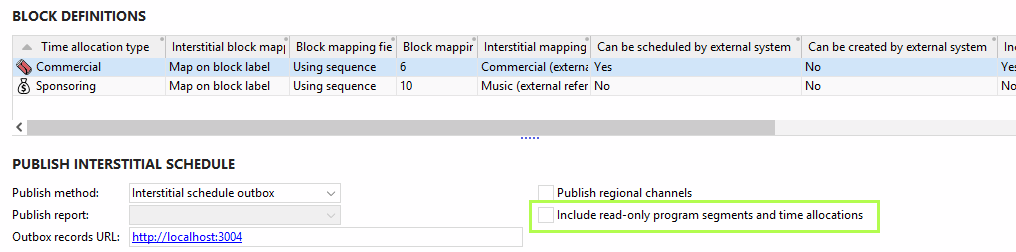
When it is selected, and there are time allocation types with Can be created by external system = No and Can be scheduled by external system = No, those time allocations are processed and synchronised in the interstitial schedule assistant in the same way as program segments:
They will have the
readOnlyattribute set to true in the response of theGET /breakSchedulecall in the commercial API.No error is returned when including the time allocation in the
POST/ commercialPlaylistcall unless it contains events.The block is shown in the interstitial schedule assistant in the same colour as program segments.
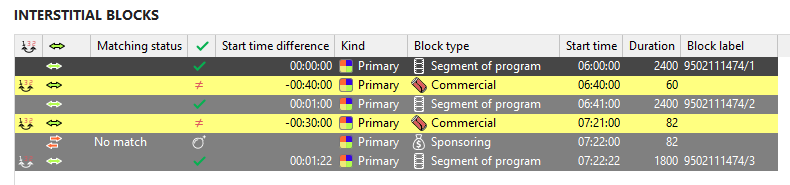
The block is matched if there is a matching ID.
The clips are excluded from synchronisation at event level.
Any changes to the time allocation are not synchronised.
When the check box is cleared, and a read-only time allocation is sent anyway in the POST /commercialPlaylist call with events, the same error as for read-only program segments is returned:
{
    "statusCode": "422",
    "message": "Operation cannot be completed due to violations",
    "timestamp": "2026-01-30T15:17:50Z",
    "concept": "Commercial playlist",
    "id": null,
    "errors": [
        {
            "errorCode": "COMMERCIAL-00009",
            "description": "$_The time allocation type Sponsoring is not allowed to have events planned by the external system",
            "data": [
                "Sponsoring"
            ]
        }
    ]
}
Note that even when the Include read-only program segments and time allocations check box is cleared for a time allocation type other than program segments, these time allocations are still included in the interstitial schedule assistant or the response of the GET /breakSchedule call in the commercial API.
Additionally, previously, the synchronisation status was not adapted for the read-only time allocations, meaning that it would still display statuses related to clips and transmission events, which could lead to confusion.
From this version, the following statuses are no longer shown on read-only time allocations:
Different clips
Clip sequence has changed
Clip duration has changed
The YAML of the commercial API remains the same after these changes.